
Transparent image of grass hills

We don't just count your Slabs.
We actually Sell them.

Vava is the first & only Sales platform built with one purpose:
Increase your Sales !!

VavaStone

Inventory

Quotes

Storefront

VIP Showrooms

Elegant Showroom

CRM Clients

Live Support

VavaStone inventory page
Transparent image of grass hills

Vava speaks your language.

EnglishItalianoPortuguêsEspañolDeutschNederlandsPolskiTürkçeالعربيةفارسیहिन्दी中文Tiếng ViệtIndonesiaTagalogไทย

Built to Protect. Designed to Sell.

Vava was built around 2 priorities:

Priority 01Protect your assets
Priority 02Help you sell more

Advanced permissions give you precise control over who can access pricing, costs, customers, inventory and sensitive company data.

At the same time, every part of Vava is designed to reduce friction, connect your team with clients faster, and turn your inventory into more sales.

San Diego, California · United States

VavaStone is a California-based company
part of the SDSharp.com group
which builds software platforms for Fortune 100 companies:
(U.S. Government, Banks, Broker-Dealers,
Big Pharma and Golf Industry)

Vava is held to the same high standard

Vava is the Sales Platform for the Stone Industry.

Vava helps you sell more by bringing your clients and sales team closer together, creating more opportunities to close business, while protecting the pricing, customer relationships, and critical information that make your company valuable.
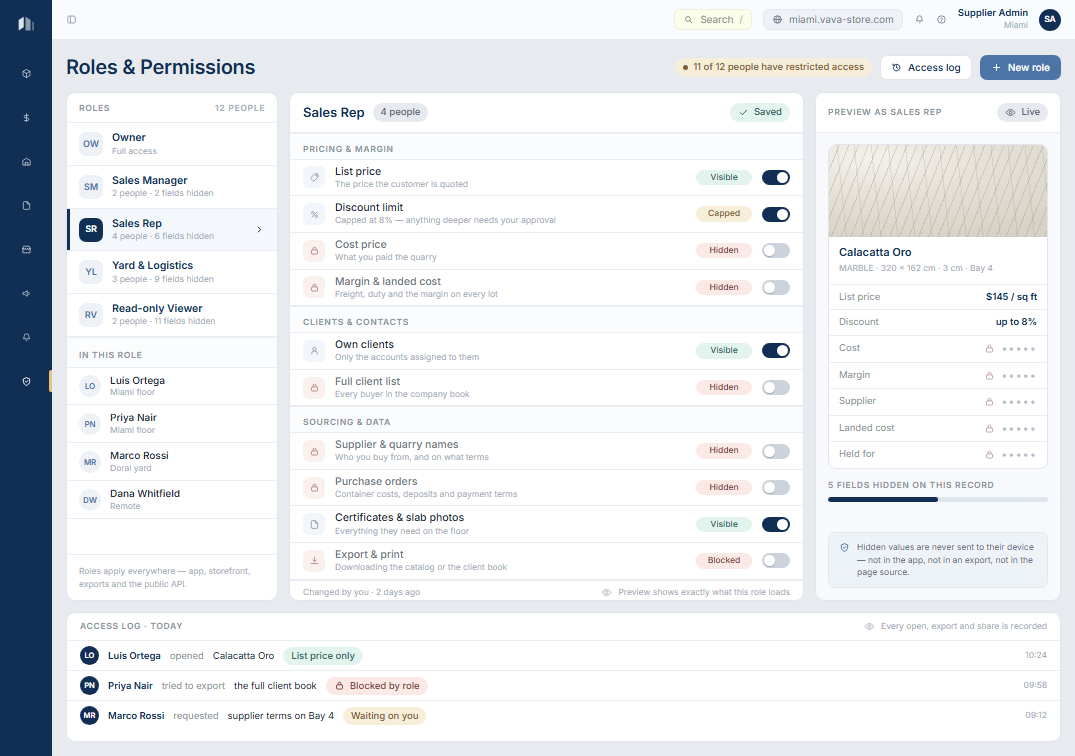
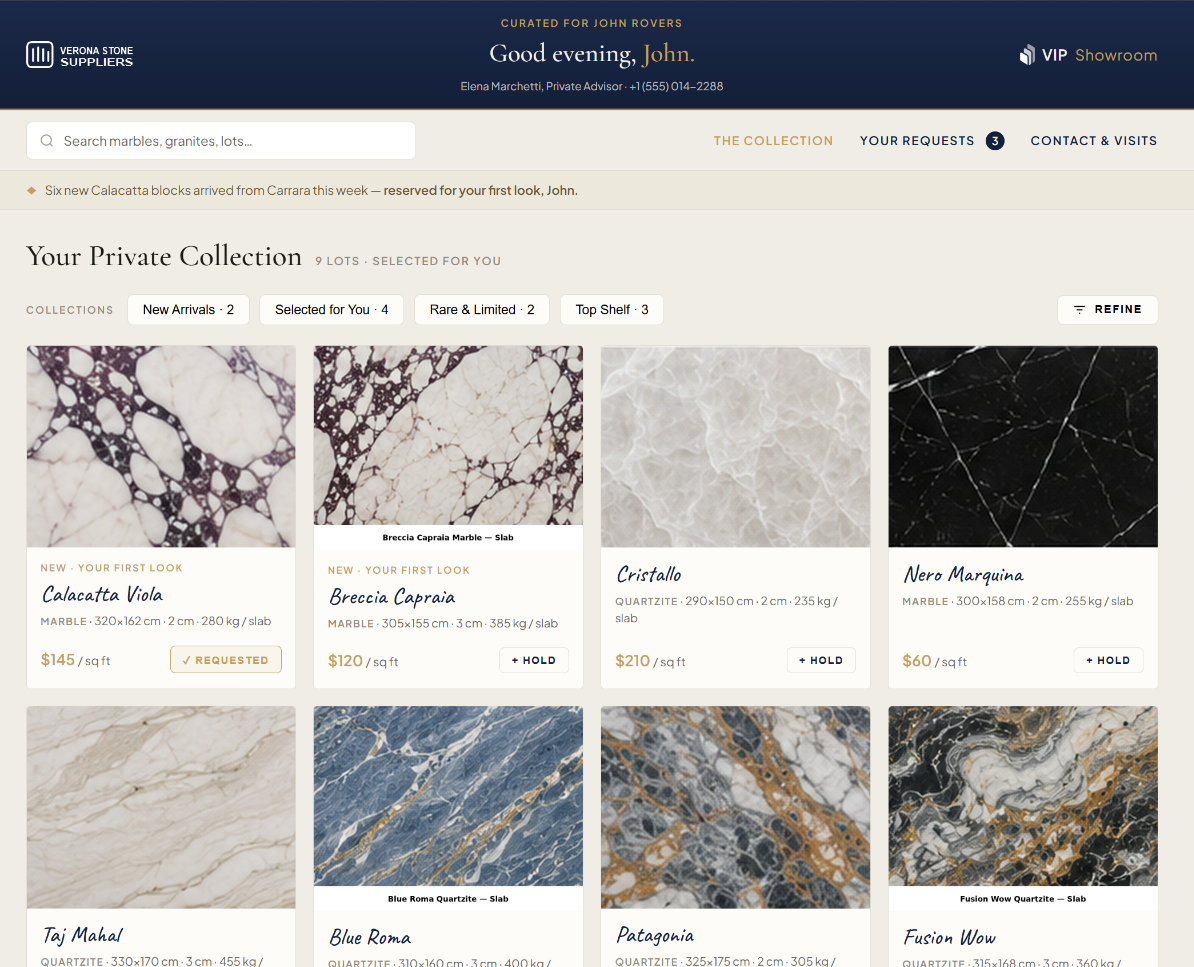
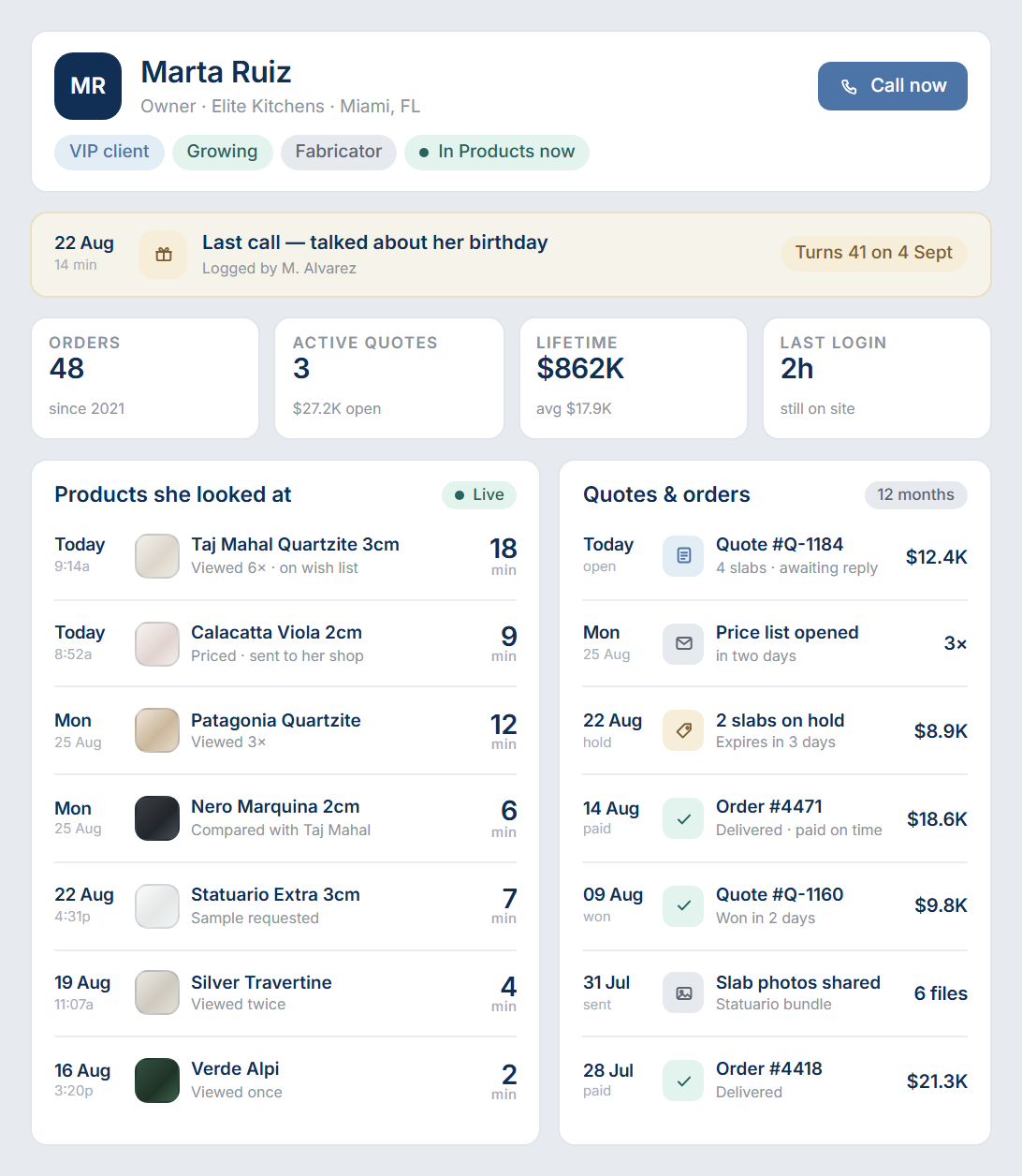
Protecting Assets

Elegant Showroom

VIP Concierge

Sales CRM

Protecting Assets
Elegant Showroom
VIP Concierge
Sales CRM

The Stone Industry. Connected.

Protecting Assets

Elegant Showroom

VIP Concierge

Sales CRM

Protecting Assets
Elegant Showroom
VIP Concierge
Sales CRM

The Stone Industry. Connected.

Protecting Assets
Elegant Showroom
VIP Concierge
Sales CRM

Protecting Assets

Scan it once.
Track it to the customer.

Vava is built so your team spends its time selling stone, not reconciling spreadsheets. From the container arriving at the gate to the slab leaving on a truck, every move is logged once and visible to everyone.

Opens on the deals that need you today.

Overdue follow-ups, quotes nobody opened and clients waiting on a price — each one with the value at stake and the action ready to send.

Nobody has to ask what to do next.
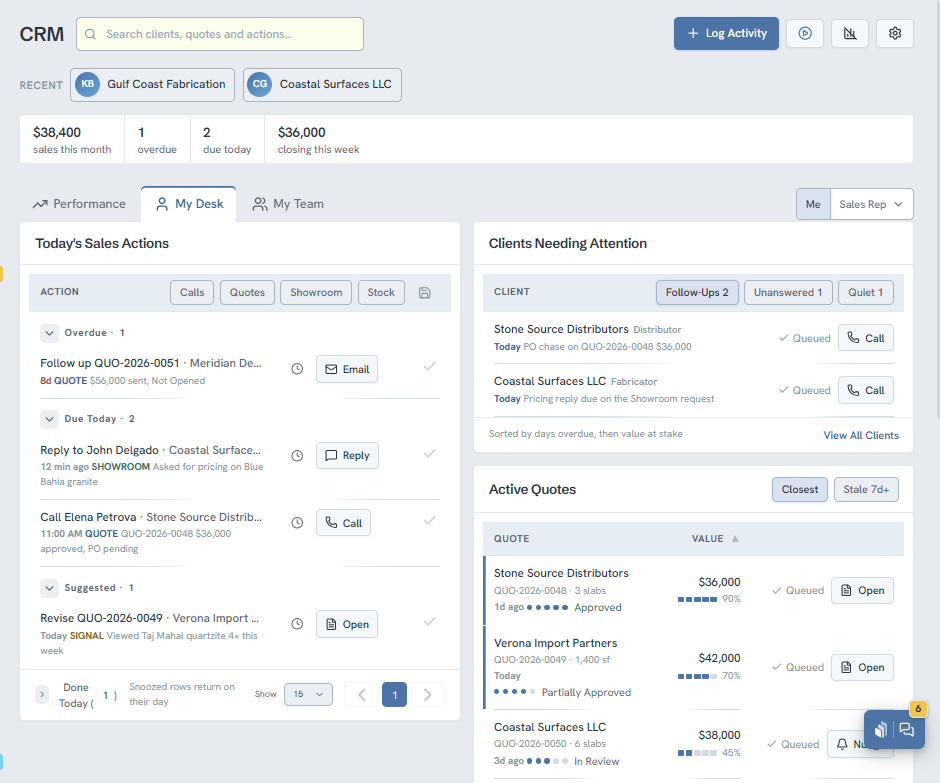
CRM desk view listing today’s overdue and due-today sales actions beside clients needing attention and active quotes.
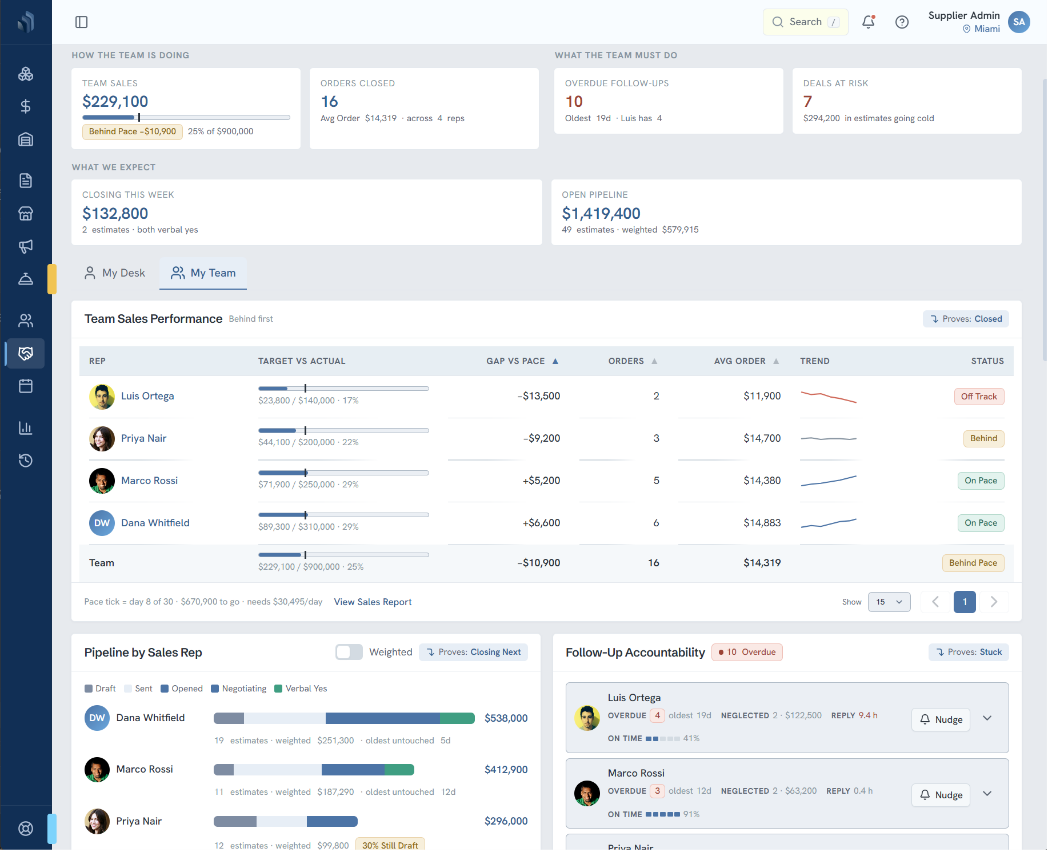
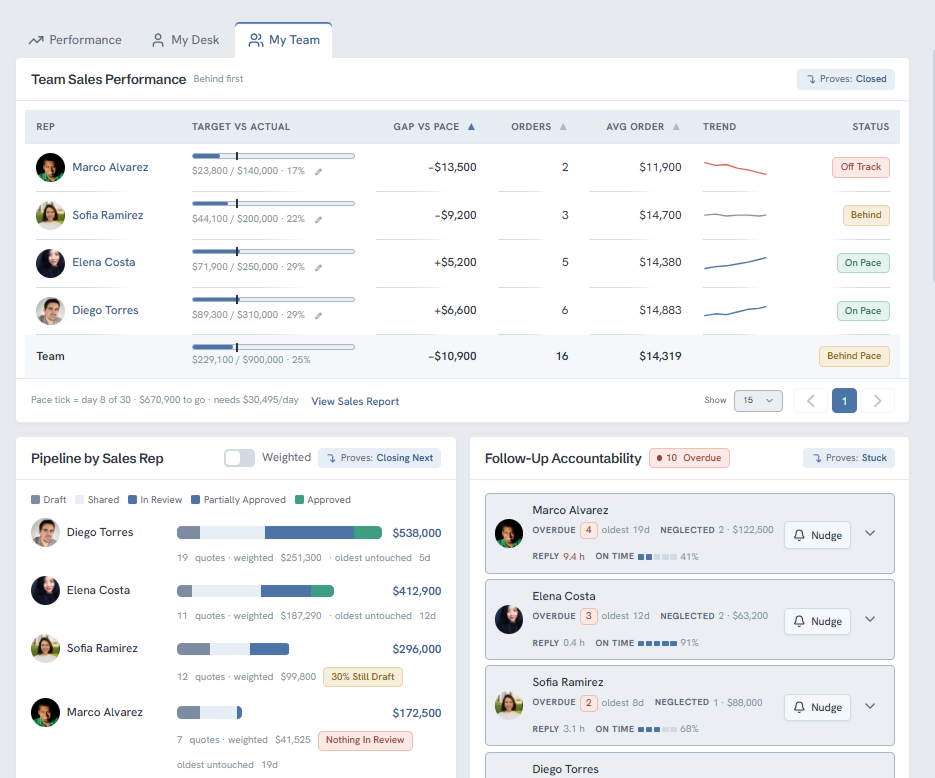
Team performance table showing each sales rep’s target against actual, gap versus pace, pipeline and overdue follow-ups.

See which rep is behind pace while the month can still be saved.

Target against actual, gap versus pace, pipeline by rep and the follow-ups going neglected — with a nudge you can send from the same row.

No surprises on the last Friday of the month.

See who is on the floor right now, and step in.

Every client in a showroom, the slab they are standing on, how long they have been there and what is already in their basket. Visits nobody has answered are flagged.

You win the visit while they are still in it.
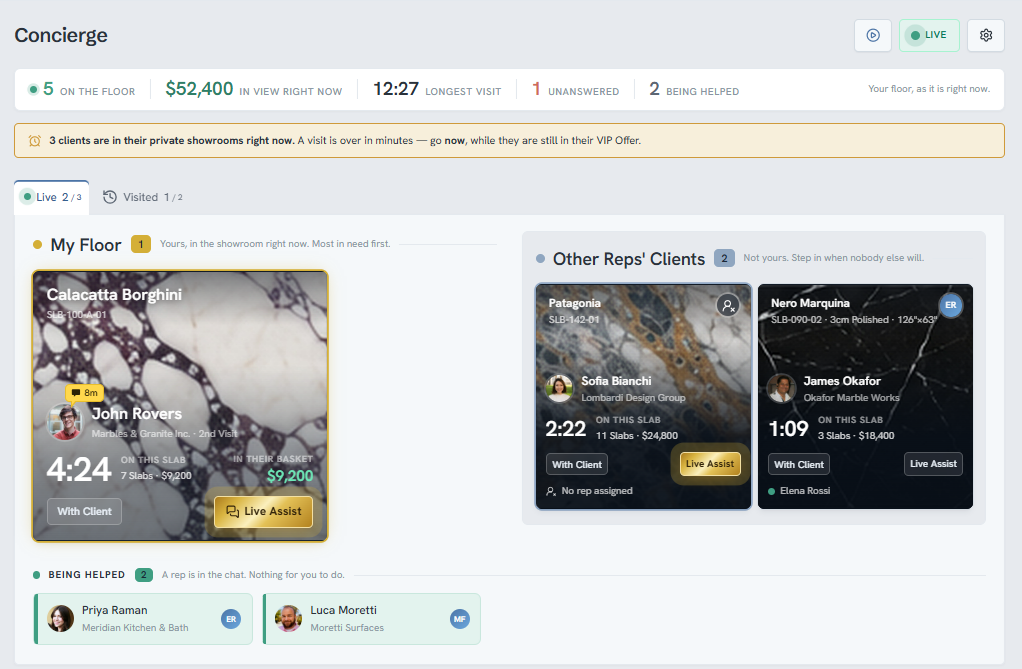
Live concierge board showing clients currently in their showrooms, the slab each is viewing, time on it and basket value.
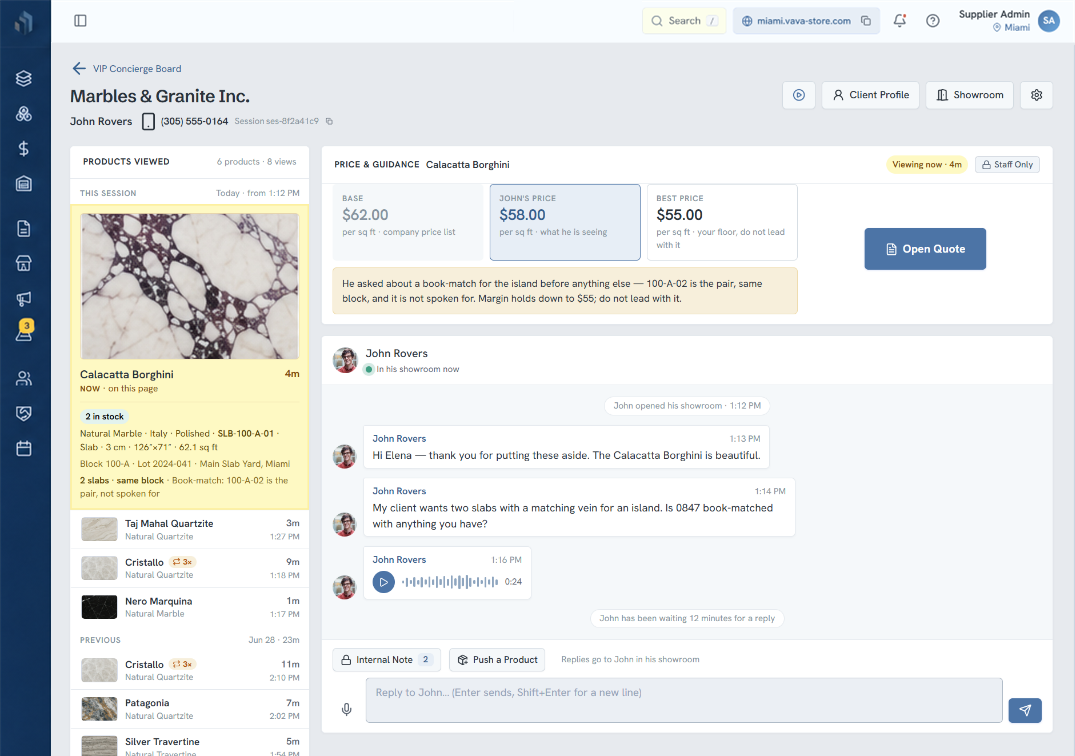
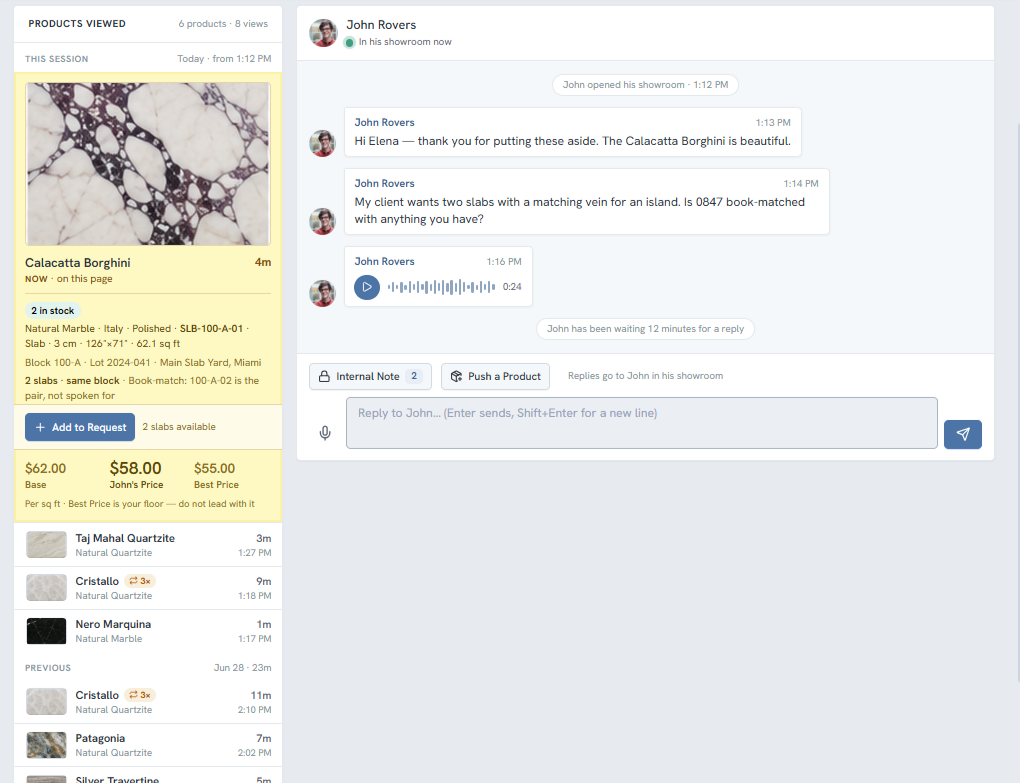
Client conversation beside a panel of the slabs they viewed this session, with stock, block details and pricing.

Use the buying signals to close the container sooner.

Their whole session sits beside the conversation — slabs viewed, minutes on each, stock, block and the price you are allowed to give.

Every reply lands warm.

Every slab knows which bin it sits in.

Open any block and Vava shows you the zone, the bin and the lot for every single slab it holds — then prints the pick sheet your crew walks the yard with.

No one walks the yard twice.
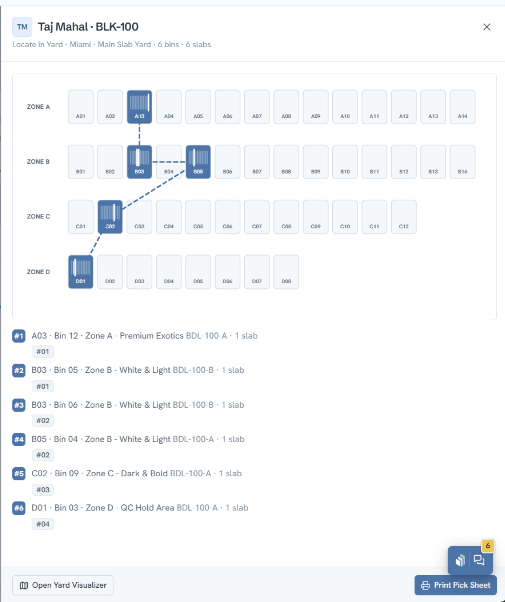
Slab locator panel showing which zone and bin each of six slabs of a quartzite block sits in, with a printable pick sheet.
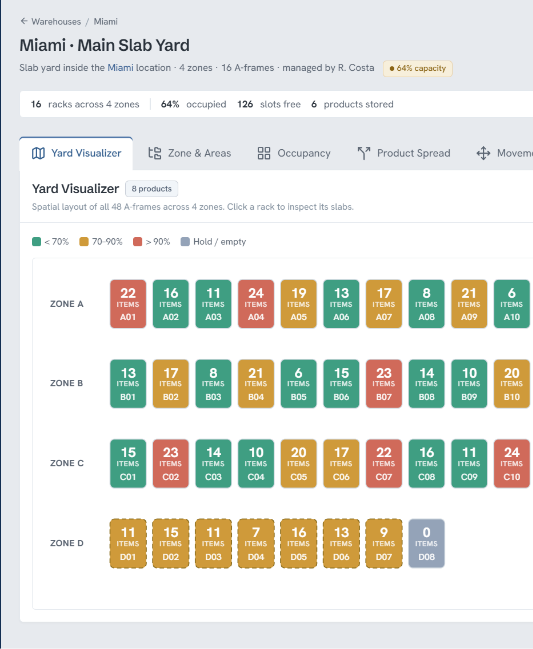
Yard visualiser showing colour-coded rack occupancy across four zones of a slab yard.

See the whole yard filling up, rack by rack.

Forty-eight A-frames across four zones, colour-coded by how full they are. Click any rack to see what is on it and what is available, reserved or on hold.

Spot dead space before it costs you.

Print a code for every rack.
Scan it from the floor.

Generate QR labels for every rack and A-frame, pick the label stock, and send them straight to the printer. Scan one in the yard and the app opens that rack.

A new hire is useful on day one.
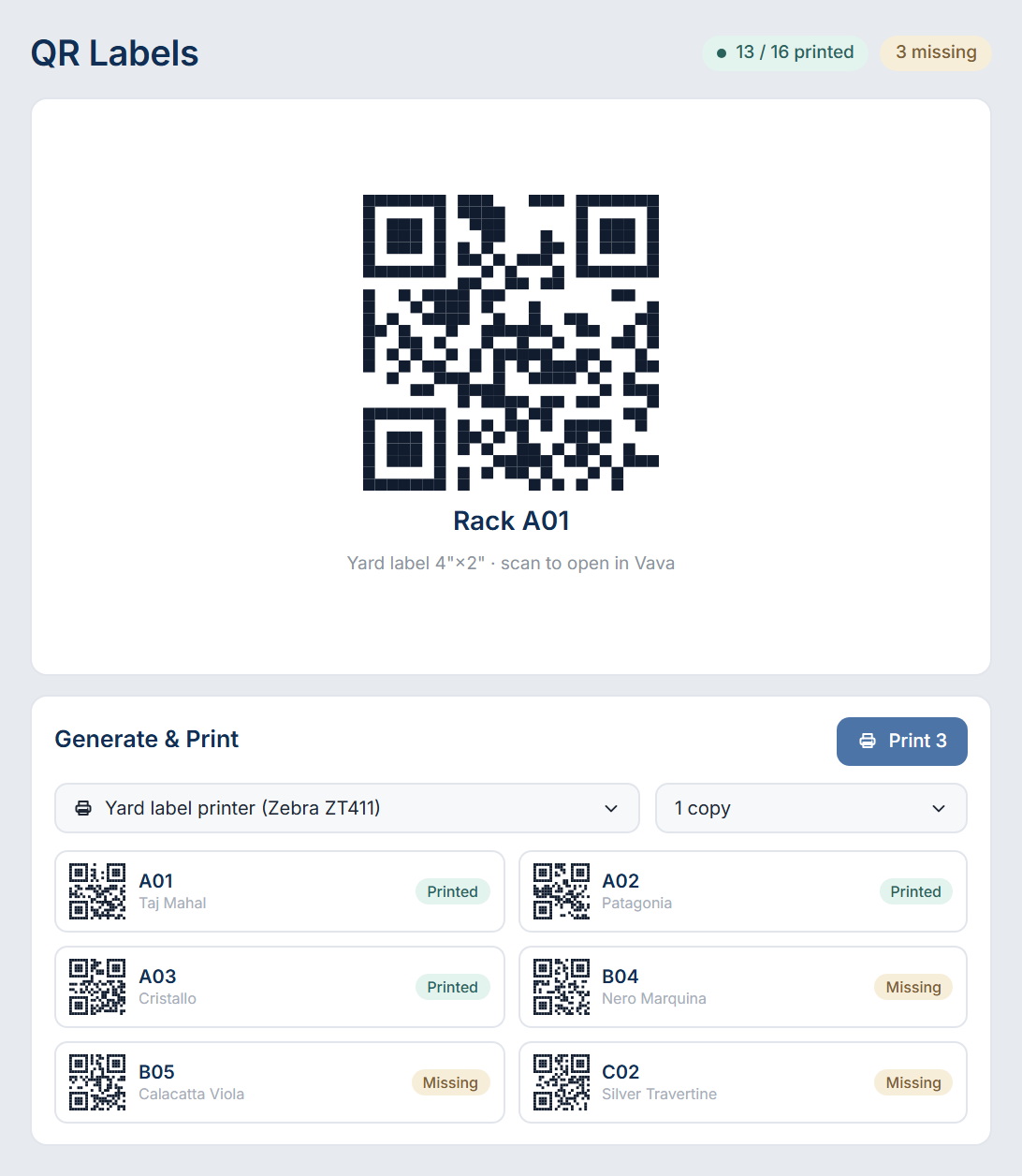
QR label generator showing a printable rack label preview and a queue of generated QR codes ready to send to the label printer.
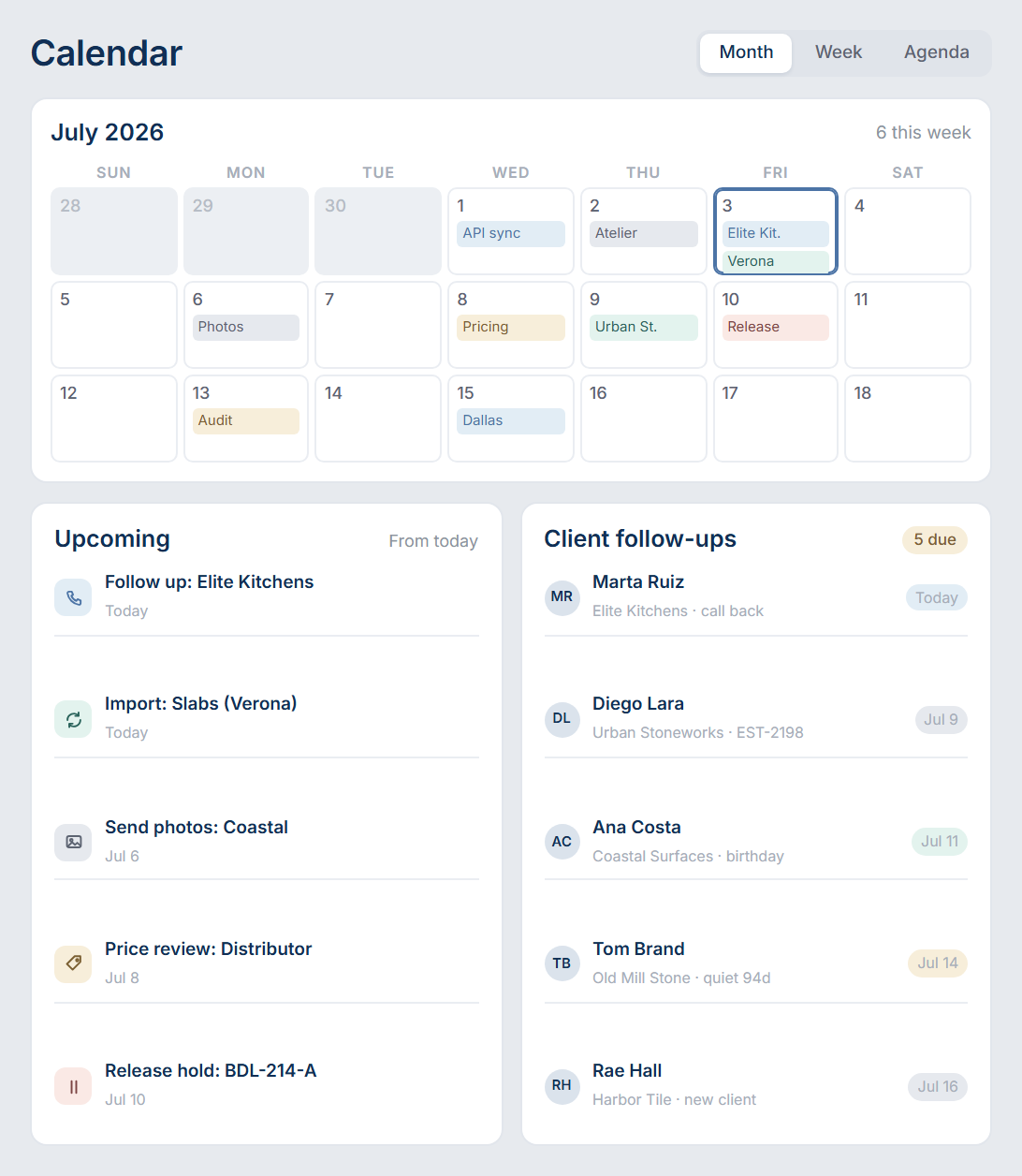
Shared calendar with scheduled imports, follow-ups and holds, and an upcoming task list beside it.

Follow-ups, imports and holds
on one calendar.

Price reviews, photo shoots, container releases, nightly imports and stock audits all land on a shared calendar, with an upcoming list beside it.

Nothing slips because someone forgot.

Know exactly which Client
went quiet.

Every client sits in a stage — new, contacted, engaged, active, dormant — and Vava counts the days since anyone last spoke to them.

Dormant accounts you can win back.
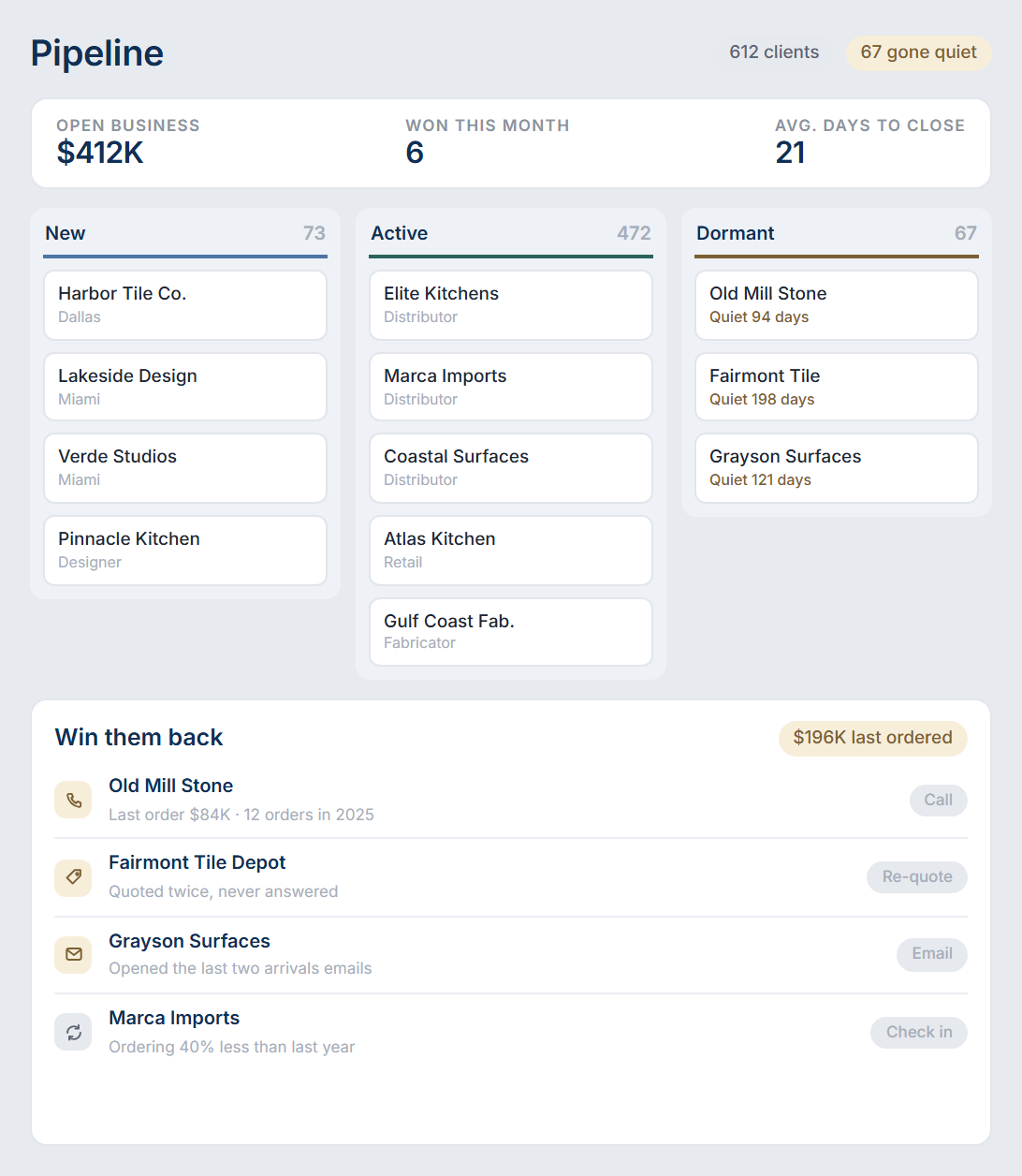
CRM pipeline board with active and dormant client columns showing how many days each account has been quiet.
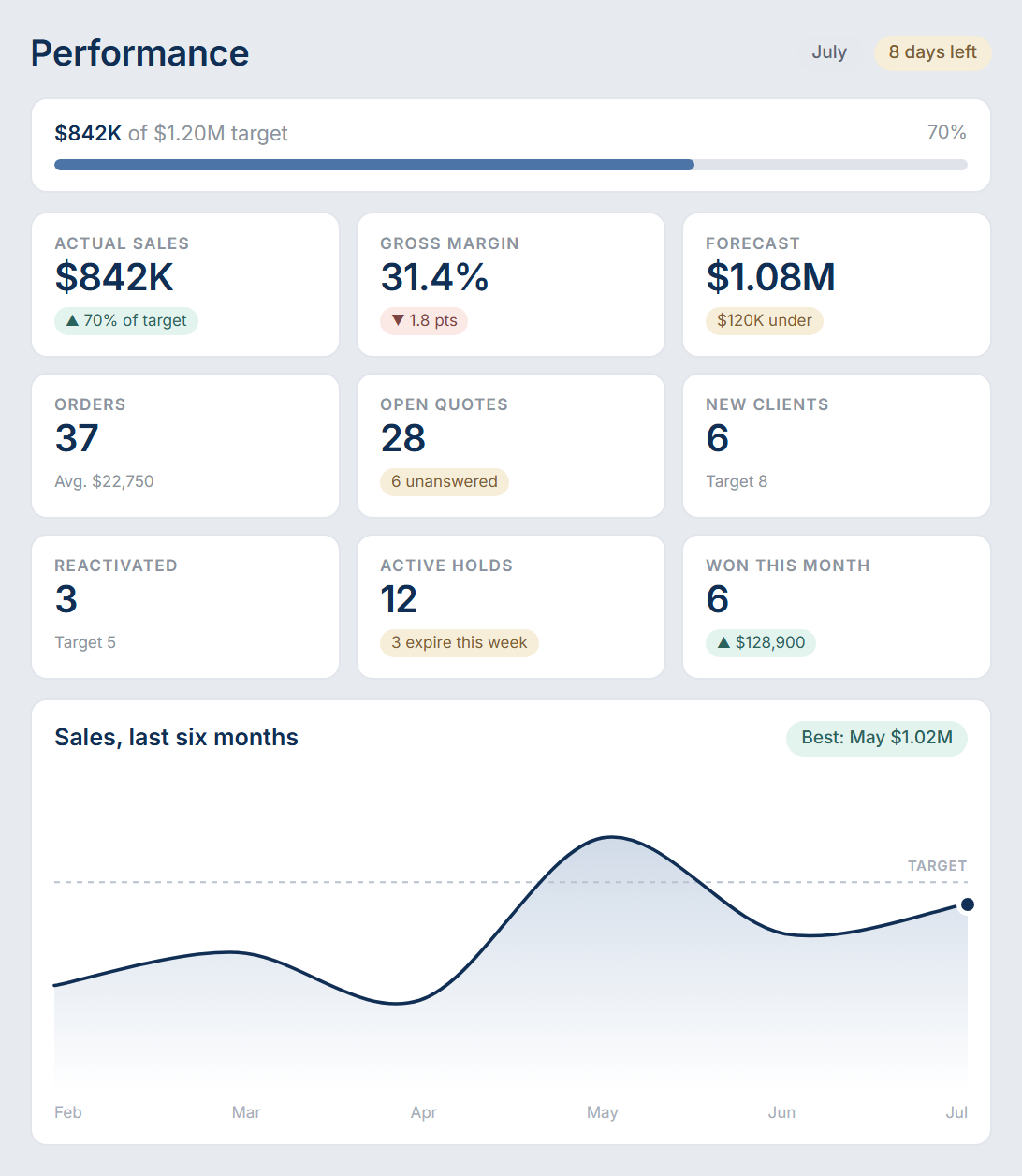
Sales manager dashboard with tiles for sales target, actual sales, orders booked, active order value, clients reactivated and open quotes.

Target, margin and forecast without a spreadsheet.

Sales against target, gross margin, orders booked, open quotes and weighted pipeline — recalculated as your team works, not assembled by hand on the last Friday of the month.

You see the shortfall while you can still fix it.

Opens on what actually needs you today.

Holds running out, quotes nobody answered, follow-ups you promised, clients waiting on a call, and what moved while you were out — all on one screen, first thing.

Nobody has to ask what to do next.
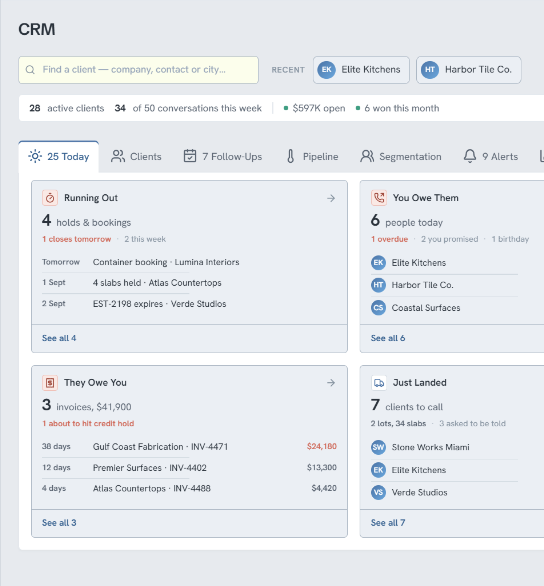
Sales rep daily dashboard listing holds running out, overdue invoices and clients waiting to be called.
Client profile showing orders, available credit and a live activity feed of what the customer is viewing in the storefront.

Walk into the call knowing what they just looked at.

See exactly which slabs they opened, how often and how long they stayed on each. No guessing what they really want — their own browsing already told you.

Every call starts warm.

Support that fixes it, not tickets that age.

Message the Vava team from inside the app. Real people who know stone, your import profiles and your data — and who change the setting for you instead of sending you a help article.

Answers in minutes, not next Tuesday.
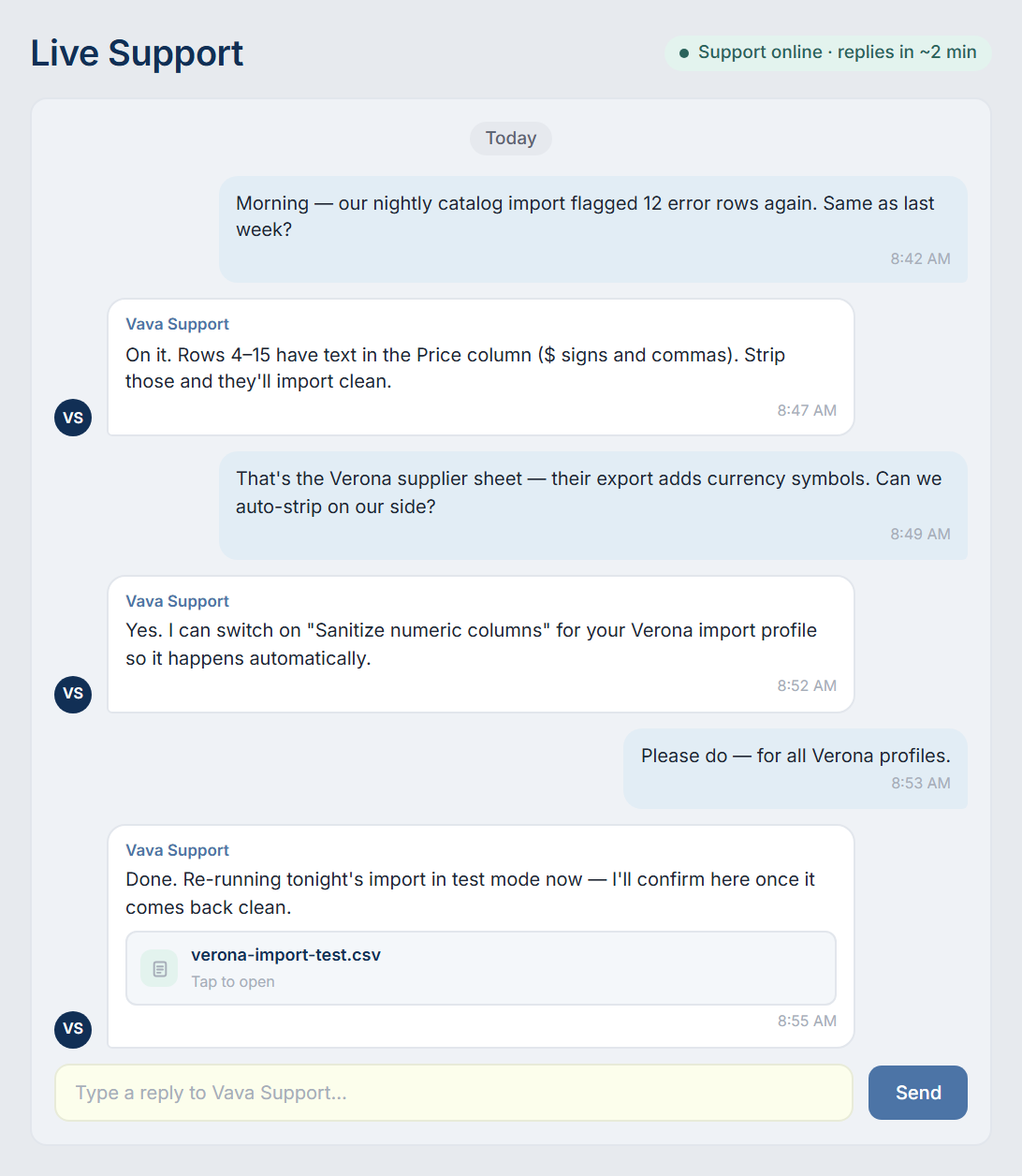
In-app live support conversation where the Vava team diagnoses a failing catalog import and fixes the import profile.

Answers to the questions that come up most.

Learn how Vava works, what implementation looks like, how it fits the accounting software you already run, and what changes on the yard floor.

General

Platform & Features

Rollout & Support

Got Questions?

Can't find what you're looking for? Reach out — we're fast.

What is Vava?

Vava is a sales and inventory platform built for the natural stone industry. Every slab gets a digital identity — dimensions, photos, lot, location, status — and your clients browse it as a live, searchable stock, quotes, all run in one place.

Who is Vava built for?

Stone businesses that hold slabs in a yard and sell them on, anywhere in the supply chain. If your stock lives on racks and A-frames, and your sales team works from photos, holds and phone calls, that is the operation Vava is shaped around.

How is this different from a general inventory system?

General systems count units. Vava tracks individual slabs, because no two are the same. Each one carries its own dimensions, photos, lot and bin, and that same record is what your client sees in the catalog, what your quote prices from, and what your yard team picks against.

We have 2+ locations. Does it work across yards?

Yes, and multi-location is one of the most common reasons companies come to us. Every yard reports into one company view, stock is visible across sites, and transfers between yards are recorded rather than agreed over the phone.

What languages does Vava support?

Vava runs in sixteen languages: English, Spanish, Portuguese, Italian, German, Dutch, Polish, Turkish, Arabic, Persian, Hindi, Chinese, Vietnamese, Indonesian, Tagalog and Thai. Your team and your clients can each work in their own, on the same records.

Do we have to change the way we sell?

No. Vava follows how stone is already sold: a client asks, you find the material, you hold it, you quote it, they confirm. What changes is that each step is recorded once and visible to everyone, instead of living in one person's phone.

How do we get started?

Book a demo and let us show how easy it's going to be for you to see the value of our powerful sales engine.

How does Vava track an individual slab?

Every slab gets a digital identity: dimensions, photos, lot, bundle, bin location and status. Move it and the record moves with it, so the catalog, the quote and the pick sheet all read from the same truth.

What do the QR labels do?

Vava generates a label for every rack and A-frame, sized for your label stock and sent straight to the printer. Scan one in the yard and the app opens that rack, so nobody walks the yard twice looking for a bundle.

Can our clients browse our stock themselves?

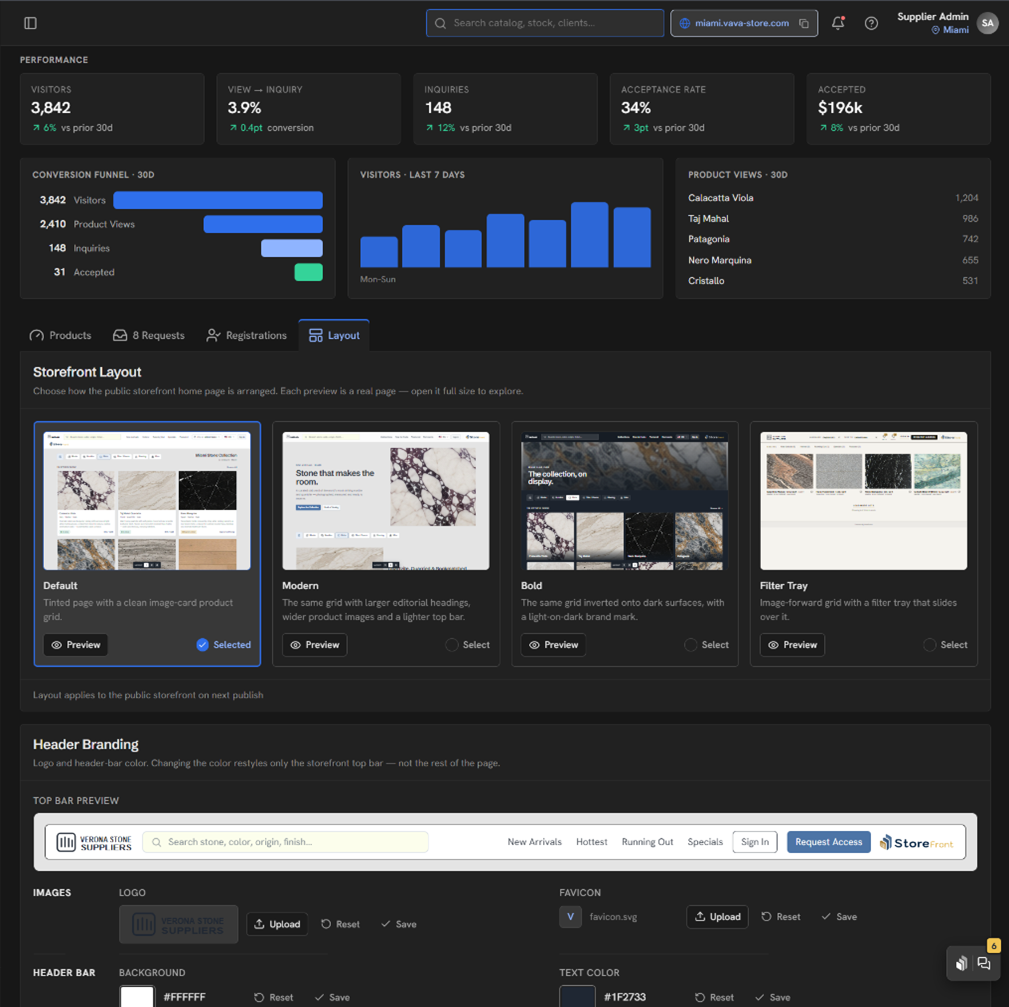
Yes. Your storefront is a live, searchable catalog of what you actually hold, carrying your branding and your pricing rules. Clients check availability, request holds and send enquiries without a phone call, and you see what they have been looking at.

Can we choose which stock our clients see?

Yes, piece by piece. Visibility and pricing are set on the individual block or slab, so material can sit in your system without appearing in your showroom. Hold three blocks of Calacatta, publish one and keep the two top-grade ones back — clients only ever see what you choose to show.

What does the CRM side actually do?

It keeps every client in a stage — new, contacted, engaged, active or dormant — and counts the days since anyone last spoke to them. You see who has gone quiet, what you owe people, what they owe you, and which follow-ups are overdue, on one screen.

Does Vava handle quotes, orders, deliveries and pickups?

Quotes, today. A confirmed quote reserves real slabs rather than a line on a list. Orders, deliveries and pickups work the same way, alongside the stock they reference: the yard sees the pick before the truck arrives, and the paperwork stays with the order instead of somebody's inbox. They reach every account in the next release.

Can we keep remnants and offcuts in the system?

Yes. Remnants live alongside full slabs with their own dimensions and photos, so they stay searchable and sellable instead of disappearing into a corner of the yard.

What about our existing accounting software?

It stays. Vava syncs with QuickBooks, Xero, MYOB and Reckon out of the box, and we can connect other packages where you need them, so every invoice, payment and credit note lands where your bookkeeper already works. Nobody has to key the same figure in twice.

How long does implementation take?

Implementation is run with you, not handed to you. We import your existing stock list, get your slabs photographed and tagged, and train your sales and yard teams before go-live. The timeline depends on how many locations and how much material you carry, so we scope it on the demo call. Our team is reachable on the live support page throughout, so you are never working it out alone.

My warehouse tried new software before and rejected it.

That is the objection we hear most, and it is a fair one. Warehouse staff work from a tablet: scan the rack, see the slab, confirm the move. There is no keyboard work on the yard floor, which is usually where the last system lost them. We put real work into the interface itself, following how people expect modern apps to behave rather than old warehouse-software habits, so the screens read logically the first time and there is little to unlearn.

Who loads our existing stock list?

We do. We take the stock list you already keep, in whatever shape you keep it, and get your slabs photographed and tagged as part of the rollout. You are not handed an empty system and a manual. If you would rather feed stock in automatically, there are APIs for it: our implementation team can set that up with you, or work alongside your own developers if you have them in-house.

What hardware do the yard teams need?

A tablet or a phone. Yard work is scan, look, confirm, so there is nothing to install on the floor and nothing to buy beyond a label printer if you do not already run one.

Can we start with one yard and expand later?

Yes, and most multi-site companies do. One yard goes first, the team settles, then the others follow. Because every yard reports into the same company view, adding the second one is not starting again.

What does training look like for each team?

Short and role-based. Sales learn the catalog, quotes and follow-ups. Yard and logistics learn scanning, bins and picks. Owners and managers learn the reporting and the permission model. Nobody sits through the parts they will never open. Every page also carries its own short video on how to use it, so someone joining later can pick it up on the spot, and the support team is there whenever they would rather ask.

What support do we get after go-live?

Support sits inside the app and does not stop after go-live. The same people who ran your import and your training answer from the support panel, every day you are working, so a question arrives with the record attached instead of being described over email.

General

Platform & Features

Rollout & Support

Got Questions?

Can't find what you're looking for? Reach out — we're fast.

What is Vava?

Vava is a sales and inventory platform built for the natural stone industry. Every slab gets a digital identity — dimensions, photos, lot, location, status — and your clients browse it as a live, searchable stock, quotes, all run in one place.

Who is Vava built for?

Stone businesses that hold slabs in a yard and sell them on, anywhere in the supply chain. If your stock lives on racks and A-frames, and your sales team works from photos, holds and phone calls, that is the operation Vava is shaped around.

How is this different from a general inventory system?

General systems count units. Vava tracks individual slabs, because no two are the same. Each one carries its own dimensions, photos, lot and bin, and that same record is what your client sees in the catalog, what your quote prices from, and what your yard team picks against.

We have 2+ locations. Does it work across yards?

Yes, and multi-location is one of the most common reasons companies come to us. Every yard reports into one company view, stock is visible across sites, and transfers between yards are recorded rather than agreed over the phone.

What languages does Vava support?

Vava runs in sixteen languages: English, Spanish, Portuguese, Italian, German, Dutch, Polish, Turkish, Arabic, Persian, Hindi, Chinese, Vietnamese, Indonesian, Tagalog and Thai. Your team and your clients can each work in their own, on the same records.

Do we have to change the way we sell?

No. Vava follows how stone is already sold: a client asks, you find the material, you hold it, you quote it, they confirm. What changes is that each step is recorded once and visible to everyone, instead of living in one person's phone.

How do we get started?

Book a demo and let us show how easy it's going to be for you to see the value of our powerful sales engine.

How does Vava track an individual slab?

Every slab gets a digital identity: dimensions, photos, lot, bundle, bin location and status. Move it and the record moves with it, so the catalog, the quote and the pick sheet all read from the same truth.

What do the QR labels do?

Vava generates a label for every rack and A-frame, sized for your label stock and sent straight to the printer. Scan one in the yard and the app opens that rack, so nobody walks the yard twice looking for a bundle.

Can our clients browse our stock themselves?

Yes. Your storefront is a live, searchable catalog of what you actually hold, carrying your branding and your pricing rules. Clients check availability, request holds and send enquiries without a phone call, and you see what they have been looking at.

Can we choose which stock our clients see?

Yes, piece by piece. Visibility and pricing are set on the individual block or slab, so material can sit in your system without appearing in your showroom. Hold three blocks of Calacatta, publish one and keep the two top-grade ones back — clients only ever see what you choose to show.

What does the CRM side actually do?

It keeps every client in a stage — new, contacted, engaged, active or dormant — and counts the days since anyone last spoke to them. You see who has gone quiet, what you owe people, what they owe you, and which follow-ups are overdue, on one screen.

Does Vava handle quotes, orders, deliveries and pickups?

Quotes, today. A confirmed quote reserves real slabs rather than a line on a list. Orders, deliveries and pickups work the same way, alongside the stock they reference: the yard sees the pick before the truck arrives, and the paperwork stays with the order instead of somebody's inbox. They reach every account in the next release.

Can we keep remnants and offcuts in the system?

Yes. Remnants live alongside full slabs with their own dimensions and photos, so they stay searchable and sellable instead of disappearing into a corner of the yard.

What about our existing accounting software?

It stays. Vava syncs with QuickBooks, Xero, MYOB and Reckon out of the box, and we can connect other packages where you need them, so every invoice, payment and credit note lands where your bookkeeper already works. Nobody has to key the same figure in twice.

How long does implementation take?

Implementation is run with you, not handed to you. We import your existing stock list, get your slabs photographed and tagged, and train your sales and yard teams before go-live. The timeline depends on how many locations and how much material you carry, so we scope it on the demo call. Our team is reachable on the live support page throughout, so you are never working it out alone.

My warehouse tried new software before and rejected it.

That is the objection we hear most, and it is a fair one. Warehouse staff work from a tablet: scan the rack, see the slab, confirm the move. There is no keyboard work on the yard floor, which is usually where the last system lost them. We put real work into the interface itself, following how people expect modern apps to behave rather than old warehouse-software habits, so the screens read logically the first time and there is little to unlearn.

Who loads our existing stock list?

We do. We take the stock list you already keep, in whatever shape you keep it, and get your slabs photographed and tagged as part of the rollout. You are not handed an empty system and a manual. If you would rather feed stock in automatically, there are APIs for it: our implementation team can set that up with you, or work alongside your own developers if you have them in-house.

What hardware do the yard teams need?

A tablet or a phone. Yard work is scan, look, confirm, so there is nothing to install on the floor and nothing to buy beyond a label printer if you do not already run one.

Can we start with one yard and expand later?

Yes, and most multi-site companies do. One yard goes first, the team settles, then the others follow. Because every yard reports into the same company view, adding the second one is not starting again.

What does training look like for each team?

Short and role-based. Sales learn the catalog, quotes and follow-ups. Yard and logistics learn scanning, bins and picks. Owners and managers learn the reporting and the permission model. Nobody sits through the parts they will never open. Every page also carries its own short video on how to use it, so someone joining later can pick it up on the spot, and the support team is there whenever they would rather ask.

What support do we get after go-live?

Support sits inside the app and does not stop after go-live. The same people who ran your import and your training answer from the support panel, every day you are working, so a question arrives with the record attached instead of being described over email.

General

Platform & Features

Rollout & Support

What is Vava?

Vava is a sales and inventory platform built for the natural stone industry. Every slab gets a digital identity — dimensions, photos, lot, location, status — and your clients browse it as a live, searchable stock, quotes, all run in one place.

Who is Vava built for?

Stone businesses that hold slabs in a yard and sell them on, anywhere in the supply chain. If your stock lives on racks and A-frames, and your sales team works from photos, holds and phone calls, that is the operation Vava is shaped around.

How is this different from a general inventory system?

General systems count units. Vava tracks individual slabs, because no two are the same. Each one carries its own dimensions, photos, lot and bin, and that same record is what your client sees in the catalog, what your quote prices from, and what your yard team picks against.

We have 2+ locations. Does it work across yards?

Yes, and multi-location is one of the most common reasons companies come to us. Every yard reports into one company view, stock is visible across sites, and transfers between yards are recorded rather than agreed over the phone.

What languages does Vava support?

Vava runs in sixteen languages: English, Spanish, Portuguese, Italian, German, Dutch, Polish, Turkish, Arabic, Persian, Hindi, Chinese, Vietnamese, Indonesian, Tagalog and Thai. Your team and your clients can each work in their own, on the same records.

Do we have to change the way we sell?

No. Vava follows how stone is already sold: a client asks, you find the material, you hold it, you quote it, they confirm. What changes is that each step is recorded once and visible to everyone, instead of living in one person's phone.

How do we get started?

Book a demo and let us show how easy it's going to be for you to see the value of our powerful sales engine.

How does Vava track an individual slab?

Every slab gets a digital identity: dimensions, photos, lot, bundle, bin location and status. Move it and the record moves with it, so the catalog, the quote and the pick sheet all read from the same truth.

What do the QR labels do?

Vava generates a label for every rack and A-frame, sized for your label stock and sent straight to the printer. Scan one in the yard and the app opens that rack, so nobody walks the yard twice looking for a bundle.

Can our clients browse our stock themselves?

Yes. Your storefront is a live, searchable catalog of what you actually hold, carrying your branding and your pricing rules. Clients check availability, request holds and send enquiries without a phone call, and you see what they have been looking at.

Can we choose which stock our clients see?

Yes, piece by piece. Visibility and pricing are set on the individual block or slab, so material can sit in your system without appearing in your showroom. Hold three blocks of Calacatta, publish one and keep the two top-grade ones back — clients only ever see what you choose to show.

What does the CRM side actually do?

It keeps every client in a stage — new, contacted, engaged, active or dormant — and counts the days since anyone last spoke to them. You see who has gone quiet, what you owe people, what they owe you, and which follow-ups are overdue, on one screen.

Does Vava handle quotes, orders, deliveries and pickups?

Quotes, today. A confirmed quote reserves real slabs rather than a line on a list. Orders, deliveries and pickups work the same way, alongside the stock they reference: the yard sees the pick before the truck arrives, and the paperwork stays with the order instead of somebody's inbox. They reach every account in the next release.

Can we keep remnants and offcuts in the system?

Yes. Remnants live alongside full slabs with their own dimensions and photos, so they stay searchable and sellable instead of disappearing into a corner of the yard.

What about our existing accounting software?

It stays. Vava syncs with QuickBooks, Xero, MYOB and Reckon out of the box, and we can connect other packages where you need them, so every invoice, payment and credit note lands where your bookkeeper already works. Nobody has to key the same figure in twice.

How long does implementation take?

Implementation is run with you, not handed to you. We import your existing stock list, get your slabs photographed and tagged, and train your sales and yard teams before go-live. The timeline depends on how many locations and how much material you carry, so we scope it on the demo call. Our team is reachable on the live support page throughout, so you are never working it out alone.

My warehouse tried new software before and rejected it.

That is the objection we hear most, and it is a fair one. Warehouse staff work from a tablet: scan the rack, see the slab, confirm the move. There is no keyboard work on the yard floor, which is usually where the last system lost them. We put real work into the interface itself, following how people expect modern apps to behave rather than old warehouse-software habits, so the screens read logically the first time and there is little to unlearn.

Who loads our existing stock list?

We do. We take the stock list you already keep, in whatever shape you keep it, and get your slabs photographed and tagged as part of the rollout. You are not handed an empty system and a manual. If you would rather feed stock in automatically, there are APIs for it: our implementation team can set that up with you, or work alongside your own developers if you have them in-house.

What hardware do the yard teams need?

A tablet or a phone. Yard work is scan, look, confirm, so there is nothing to install on the floor and nothing to buy beyond a label printer if you do not already run one.

Can we start with one yard and expand later?

Yes, and most multi-site companies do. One yard goes first, the team settles, then the others follow. Because every yard reports into the same company view, adding the second one is not starting again.

What does training look like for each team?

Short and role-based. Sales learn the catalog, quotes and follow-ups. Yard and logistics learn scanning, bins and picks. Owners and managers learn the reporting and the permission model. Nobody sits through the parts they will never open. Every page also carries its own short video on how to use it, so someone joining later can pick it up on the spot, and the support team is there whenever they would rather ask.

What support do we get after go-live?

Support sits inside the app and does not stop after go-live. The same people who ran your import and your training answer from the support panel, every day you are working, so a question arrives with the record attached instead of being described over email.

Your next slab “Sale”
...starts here

Want to increase your sales? Give us 30 minutes and we will show you how, using your own inventory. Trusted by 100+ natural stone distributors across North America, Europe and Latin America.

Stock

Quotes

Pricing

Showroom

VIP Offers

Clients

Transparent image of sand dunes